Thursday, August 4, 2011

I Love Being In the Future

I feel very fortunate to live in a time (or lasted long enough for this time to arrive) when Indie developers are actually valued and endeavors like iTunes and Steam and The Humble Indie Bundle exist to let some of us wet our toes in enormous, churning rivers of cash. It kind of blows me away, especially when I think about how thrilled I was (in a previous century) to earn a teeny trickle of money hawking my shareware on CompuServe.

But I feel even more lucky, when it comes down to it, to live in a time when I can read articles like this one.

Here is one choice sentence:

Meeroos, an extremely popular species of virtual, breedable animal in Second Life, are now starving, because griefers have been selling their owners unauthorized food, and Linden Lab accidentally shut them down *and* their legitimate food supplier.


It's stuff like this that, truly, puts a song in my heart and a skip in my step.

Wednesday, August 3, 2011

Don't Ask Questions Until the Player Can Answer

When I started writing fantasy role-playing games for a living, I did a lot of dumb things. Since then, it's been a painfully slow process figuring out how to be less dumb. Every time I start a new game, there is a point where I go, "Wait. Why don't I do this thing this new way? In fact, why haven't I always done it that way?" And then I slap my forehead. Hopefully, it hurts.

One of my new, hard-earned rules of design has to do with training your characters. And, since it seems like every game and its cousin has some sort of level-gaining and stat-building these days, I think the rule is getting more relevant every day:

The number of decisions you have to make to build your character should be proportional to the amount of time you've spent playing the game. The more you play, the more you should decide.

Or, to put it another way ...

Whenever you make a decision about your character at the very beginning of the game, you are answering a question that hasn't even been asked yet.


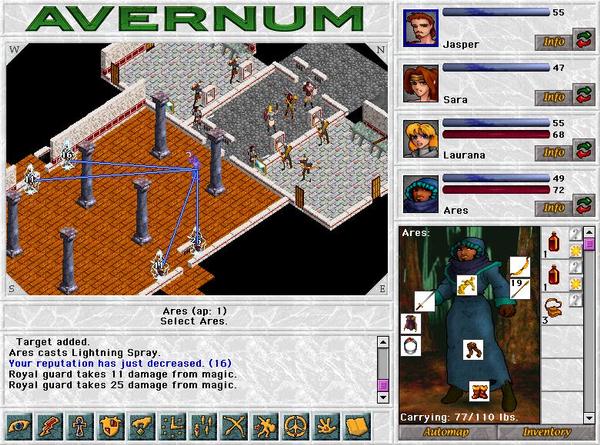
So design wonks, get ready. Here is an example from my game Avernum, released in 1999. I will compare it to the rewritten version, Avernum: Escape From the Pit, out later this year. (And this will also double as a little taste of a preview of the new game, for those who care.)

The Bad Way I Did It Before

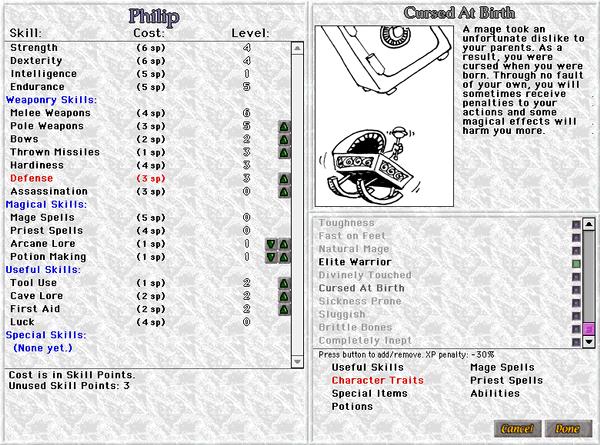
Avernum is an old school role-playing game. There are a lot of skills you can train to make your character stronger. There are the base attributes (Strength, Intelligence, Dexterity, Endurance) and regular skills (Swords, Spells, Lore, etc). You start out with a bunch of skill points, and you get more with each level. You should spend these on skills.


You start out with a ton of skill points, so that you can majorly customize your character from the beginning. You can use skill points to increase base attributes or regular skills, but the base attributes are expensive. However, it could break the system if a player put a huge amount of skill points in certain skills. To limit this, I made increasing a skill cost more skill points the higher you trained it. At high levels, you might have to save up for two or three levels to get enough skill points to raise a major skill one point.

Think about this. It's a system where the more you play and learn about the challenges facing you, the less you can do to customize your characters. You have to make most of the big changes at low level, when skills are cheap. Worse, it was necessary to increase the base attributes to survive (especially Endurance, which increases health), but they were so expensive that doing so required careful planning. As a result of this mess, many players had problems with getting halfway through the game and finding that they were not strong enough to proceed. These players got angry at me, and justifiably so.

There was also a traits system. Traits are special character qualities, some positive, some negative, that affected your characters. They could make you better at spells, more vulnerable to disease, and so on. Good traits came with a penalty to experience earned. Bad traits gave you a bonus. You could have at most two traits.

And here's the awesome part. You could only pick these traits at the beginning of the game, and you couldn't change them. Major decisions that affect how you play the entire game, and you make them before you've even fought one monster. It's very hardcore and old school. By which I mean that it's mean-spirited and unnecessarily punitive.

The Better Way I Do It Now

There are still base attributes (unchanged), skills (mostly unchanged), and traits (an all-new, very long list).

When you make your characters, you can increase five skills and pick one trait from the long list. This is far, FAR less customization at the beginning than was allowed in Avernum. Because of this, many gamers will try to make a party, think I have completely dumbed down the system, and ragequit. Price of doing business.


But then, when you gain a level, a base attribute goes up by one point. It's different each level, so every four levels each attribute has gone up by one. In addition, each level you can choose one attribute to increase by one. This allows a lot of character customization while making sure all skills go up gradually so that you won't be hamstrung by completely neglecting an attribute.

Each level, you can also increase two different skills by one point. Thus, you never stop being able to shape your characters. As you get a better idea of the challenges you are facing, you can mold your characters to enable them to proceed.

Finally, every other level, you can pick one trait from the long list. The number of available choices starts out small (to keep from confusing new players) and grows dramatically as you proceed. You will eventually have a lot of traits. Some of them give simple bonuses to your spells or attacks, while others (like Backstab or Swordmage) will affect how you actually play your character.

I plan to take a lot of heat because I allow fewer choices early on, but overall you make more decisions to mold your character in the new system than in the old system, and there are more ways to customize a character. The change means that you make a larger percentage of the decisions later on. As it should be.

Of Course, There Is No Way To Win

I have often observed that people hate change. I have tried to make a more friendly system that provides more customization, but a lot of people will be angry about the loss of the old system (which has been in place for a very long time). I can totally understand this, but I still need to always strive to make things better.

Also, while the old system made it very possible to build a party that would find itself stuck and unable to proceed. Some players actually like that. To them, the challenge of avoiding that fate is part of the game, and the threat of a failed party adds excitement to the game. For them, I can only suggest playing on Torment difficulty. It will provide ample possibility of horrible failure.

But I'm very happy with the new system. I think it allows players to answer the questions the game poses when they understand what those questions truly are. And now I enter beta testing and the actual balancing of the new system. And that, of course, is when the suffering truly begins.

Tuesday, August 2, 2011

How To Drop/Create EM dbconsole of Single Instance Database

Manually recreate dbconsole 10gR2

Single Instance : $ORACLE_HOME/bin/emca -config dbcontrol db -repos create
RAC Database : $ORACLE_HOME/bin/emca -config dbcontrol db -repos create -cluster

First remove repository and files

How to drop DBConsole configuration files using EMCA (leave repository intact) ?

  •  


  • To remove DBConsole configuration files (leaving repository intact) run following EMCA command.

    <ORACLE_HOME>/bin/emca -deconfig dbcontrol db

    Enter the following information:
    Database SID: orcl
    Do you wish to continue? [yes(Y)/no(N)]:

    Note: This command will remove only the DBConsole configuration files which are under  


  • <ORACLE_HOME>/<Hostname_SID> and 


  • <ORACLE_HOME>/oc4j/j2ee/OC4J_DBConsole_<Hostname>_<SID>


  • EXAMPLE

    D:>emca -deconfig dbcontrol db

    STARTED EMCA at Aug 2, 2011 12:38:43 PM
    EM Configuration Assistant, Version 10.2.0.1.0 Production
    Copyright (c) 2003, 2005, Oracle.  All rights reserved.


    Enter the following information:
    Database SID: orcl


    Do you wish to continue? [yes(Y)/no(N)]: Y
    Aug 2, 2011 12:38:54 PM oracle.sysman.emcp.EMConfig perform
    INFO: This operation is being logged at D:\oracle\product\10.2.0\db_1\cfgtoollog
    s\emca\emca_2011-08-02_12-38-43-PM.log.
    Aug 2, 2011 12:38:56 PM oracle.sysman.emcp.EMDBPreConfig invoke
    WARNING: Database instance unavailable.
    Aug 2, 2011 12:38:56 PM oracle.sysman.emcp.util.DBControlUtil stopOMS
    INFO: Stopping Database Control (this may take a while) ...
    Aug 2, 2011 12:39:01 PM oracle.sysman.emcp.target.TargetManager cleanupAgent
    WARNING: Error initializing SQL connection. SQL operations cannot be performed
    Enterprise Manager configuration completed successfully
    FINISHED EMCA at Aug 2, 2011 12:39:02 PM

    Drop DBConsole configuration files manually
    remove both directories

  • <ORACLE_HOME>/<Hostname_SID>


  • <ORACLE_HOME>/oc4j/j2ee/OC4J_DBConsole_<Hostname>_<SID>


  • How to drop DBConsole repository objects manually ?

    DBConsole repository can be dropped manually by executing following SQL statements.


    Step 1: Drop AQ related objects in the SYSMAN schema Logon SQLPLUS as user SYS
     
    SQL> exec DBMS_AQADM.DROP_QUEUE_TABLE(queue_table=>'SYSMAN.MGMT_NOTIFY_QTABLE',force=>TRUE);

    Step 2: Drop the DB Control Repository Objects Logon SQLPLUS as user SYS or SYSTEM, and drop the sysman account and management objects:

     
    SQL> SHUTDOWN IMMEDIATE;
    SQL> STARTUP RESTRICT;
    SQL> EXEC sysman.emd_maintenance.remove_em_dbms_jobs;
    SQL> EXEC sysman.setEMUserContext('',5);
    SQL> REVOKE dba FROM sysman;
    SQL> DECLARE
    CURSOR c1 IS
    SELECT owner, synonym_name name
    FROM dba_synonyms
    WHERE table_owner = 'SYSMAN';
    BEGIN
    FOR r1 IN c1 LOOP
    IF r1.owner = 'PUBLIC' THEN
    EXECUTE IMMEDIATE 'DROP PUBLIC SYNONYM '||r1.name;
    ELSE
    EXECUTE IMMEDIATE 'DROP SYNONYM '||r1.owner||'.'||r1.name;
    END IF;
    END LOOP;
    END;
    /
    SQL> DROP USER mgmt_view CASCADE;
    SQL> DROP ROLE mgmt_user;
    SQL> DROP USER sysman CASCADE;
    SQL> ALTER SYSTEM DISABLE RESTRICTED SESSION;


    On Windows you also need to delete the DB Console service:

    Using regedit
    - run regedit
    - navigate to HKEY_LOCAL_MACHINE/SYSTEM/CurrentControlSet/Services
    - locate the OracleDBConsole<sid> entry and delete it
    Or
    On Windows XP and Windows Server 2003 you can run the following from the command line:
    CMD> sc delete <service_name>
    - where <service_name> is the DB Control service name (typically: OracleDBConsole<sid>)
    Or
    CMD> nmesrvops delete <servicename>
    - where <service_name> is the DB Control service name (typically: OracleDBConsole<sid>)
    .


    Monday, August 1, 2011

    EM Database Control -Recovering From Errors Due to CA Expiry on Oracle DB 10.2.0.4


      Purpose
         What is the Issue?
      Scope and Application
         Who is Affected?
      Enterprise Manager Database Control Configuration - Recovering From Errors Due to CA Expiry on Oracle Database 10.2.0.4 or 10.2.0.5 [Video]
         What Happens During Database Control Configuration Failure?
         Recovering from Configuration Errors on a Single Instance Database
         Recovering from Configuration Errors in an Oracle Real Application Clusters (RAC) Environment
      References


    Applies to:

    Oracle Server - Enterprise Edition - Version: 10.2.0.4 to 10.2.0.5 - Release: 10.2 to 10.2
    Oracle Database Configuration Assistant - Version: 10.2.0.4 to 10.2.0.5   [Release: 10.2 to 10.2]
    Information in this document applies to any platform.
    Enterprise Manager Database Control 10.2.0.4 and 10.2.0.5

    Purpose

    What is the Issue?

    In Enterprise Manager Database Control with Oracle Database 10.2.0.4 and 10.2.0.5, the root certificate used to secure communications via the Secure Socket Layer (SSL) protocol will expire on 31-Dec-2010 00:00:00. The certificate expiration will cause errors if you attempt to configure Database Control on or after 31-Dec-2010. Existing Database Control configurations are not impacted by this issue.

    If you plan to configure Database Control with either of these Oracle Database releases, Oracle strongly recommends that you apply Patch 8350262 to your Oracle Home installations before you configure Database Control. Configuration of Database Control is typically done when you create or upgrade Oracle Database, or if you run Enterprise Manager Configuration Assistant (EMCA) in standalone mode.

    Note the following:

    • The issue impacts configuration of Database Control with Oracle Database 10.2.0.4 and 10.2.0.5 only. It does not impact database creation or upgrade.
    • The issue does not impact existing Database Control configurations.
    • Application of Patch 8350262 does not require any database downtime

    Note: If you apply Patch 8350262 to your Oracle Home installations before you configure Database Control, you will not need to follow the recovery steps outlined in this document.

    Scope and Application

    Who is Affected?

    If you did not apply Patch 8350262 before configuring Database Control, you will encounter errors during the Database Control configuration process on or after 31-Dec-2010 under the following conditions:
    • When configuring Database Control while installing Oracle Database 10.2.0.4 or 10.2.0.5 using Database Configuration Assistant (DBCA)
    • When configuring Database Control while upgrading to Oracle Database 10.2.0.4 or 10.2.0.5 on a new or existing Oracle Home using Database Upgrade Assistant (DBUA)
    • When configuring or re-configuring Database Control for Oracle Database 10.2.0.4 or 10.2.0.5 on an existing Oracle Home using Database Configuration Assistant (DBCA) or Enterprise Manager Configuration Assistant (EMCA)

    Enterprise Manager Database Control Configuration - Recovering From Errors Due to CA Expiry on 

    Oracle Database 10.2.0.4 or 10.2.0.5 [Video] PATCH:8350262

    CREATE DBCONSOLE CERT WITH 10YEAR VALIDITY NOTE:1217493.1

    ATTENTION - Enterprise Manager Database Control 10.2.0.4 Or 10.2.0.5 - Patch Required from 31-Dec-2010 onwards

    What Happens During Database Control Configuration Failure?

    Database Configuration Assistant (DBCA) and Database Upgrade Assistant (DBUA) Errors


    Database Configuration Assistant (DBCA) and Database Upgrade Assistant (DBUA) will report the following error in the console:

    Could not complete the Enterprise Manager configuration.
    Enterprise manager configuration failed due to the following error –
    Error starting Database Control

    Enterprise Manager Configuration Assistant (EMCA) Errors

    Enterprise Manager Configuration Assistant (EMCA) will write errors similar to those below to the emca.log file:


    CONFIG: Securing Database Control completed successfully .
    Jan 2, 2011 7:22:47 PM oracle.sysman.emcp.ParamsManager getParam
    CONFIG: No value was set for the parameter ORACLE_HOSTNAME.
    Jan 2, 2011 7:22:47 PM oracle.sysman.emcp.util.DBControlUtil startOMS
    INFO: Starting Database Control (this may take a while) ...
    Jan 2, 2011 7:22:47 PM oracle.sysman.emcp.util.PlatformInterface addEnvVarToList
    CONFIG: Value for env var 'ORACLE_HOSTNAME' is '', discarding the same
    CONFIG: Returning env array from cache
    Jan 2, 2011 7:22:47 PM oracle.sysman.emcp.util.PlatformInterface executeCommand
    CONFIG: Starting execution: /myhost/bin/emctl start dbconsole
    Jan 2, 2011 7:27:26 PM oracle.sysman.emcp.util.PlatformInterface executeCommand
    CONFIG: Exit value of 1
    Jan 2, 2011 7:27:26 PM oracle.sysman.emcp.util.PlatformInterface executeCommand
    CONFIG: Oracle Enterprise Manager 10g Database Control Release 10.2.0.4.0
    Copyright (c) 1996, 2007 Oracle Corporation. All rights reserved.
    https://myhost:5501/em/console/aboutApplication
    Starting Oracle Enterprise Manager 10g Database Control
    ............................................................................................. failed.
    ------------------------------------------------------------------
    Logs are generated in directory /myhost/sysman/log
    Jan 2, 2011 7:27:26 PM oracle.sysman.emcp.util.PlatformInterface executeCommand
    WARNING: Error executing /myhost/bin/emctl start dbconsole
    Jan 2, 2011 7:27:26 PM oracle.sysman.emcp.EMConfig perform
    SEVERE: Error starting Database Control
    Refer to the log file at /myhost/dbua/d4/upgrade/emConfig.log for more details.
    Jan 2, 2011 7:27:26 PM oracle.sysman.emcp.EMConfig perform
    CONFIG: Stack Trace:
    oracle.sysman.emcp.exception.EMConfigException: Error starting Database Control
    at oracle.sysman.emcp.EMDBPostConfig.performUpgrade(EMDBPostConfig.java:763)
    at oracle.sysman.emcp.EMDBPostConfig.invoke(EMDBPostConfig.java:232)
    at oracle.sysman.emcp.EMDBPostConfig.invoke(EMDBPostConfig.java:193)
    at oracle.sysman.emcp.EMConfig.perform(EMConfig.java:184)
    at oracle.sysman.assistants.util.em.EMConfiguration.run(EMConfiguration.java:436)
    at oracle.sysman.assistants.util.em.EMConfigStep.executeImpl(EMConfigStep.java:140)
    at oracle.sysman.assistants.util.step.BasicStep.execute(BasicStep.java:210)
    at oracle.sysman.assistants.util.step.BasicStep.callStep(BasicStep.java:251)
    at oracle.sysman.assistants.dbma.backend.EMConfigStep.executeStepImpl(EMConfigStep.java:104)
    at oracle.sysman.assistants.dbma.backend.SummarizableStep.executeImpl(SummarizableStep.java:175)
    at oracle.sysman.assistants.util.step.BasicStep.execute(BasicStep.java:210)
    at oracle.sysman.assistants.util.step.Step.execute(Step.java:140)
    at oracle.sysman.assistants.util.step.StepContext$ModeRunner.run(StepContext.java:2488)
    at java.lang.Thread.run(Thread.java:534)

    The EMCA console will display output similar to the following:

    aime@myhost09 db_1]$ bin/emca -config dbcontrol db -repos recreate -cluster
    STARTED EMCA at Jan 11, 2011 4:11:01 PM
    EM Configuration Assistant, Version 10.2.0.1.0 Production
    Copyright (c) 2003, 2005, Oracle. All rights reserved.

    Enter the following information:
    Database unique name: catest
    Database Control is already configured for the database catest
    You have chosen to configure Database Control for managing the database catest

    This will remove the existing configuration and the default settings and perform a fresh configuration
    Do you wish to continue? [yes(Y)/no(N)]: Y
    Listener port number: 1521
    Cluster name: mycluster
    Password for SYS user:
    Password for DBSNMP user:
    Password for SYSMAN user:
    Email address for notifications (optional):
    Outgoing Mail (SMTP) server for notifications (optional):

    ........

    Jan 11, 2011 4:18:05 PM oracle.sysman.emcp.util.DBControlUtil secureDBConsole
    INFO: Securing Database Control (this may take a while) ...
    Jan 11, 2011 4:19:31 PM oracle.sysman.emcp.util.DBControlUtil startOMS
    INFO: Starting Database Control (this may take a while) ...
    Jan 11, 2011 4:28:38 PM oracle.sysman.emcp.EMConfig perform
    SEVERE: Error starting Database Control
    Refer to the log file at /myhost/oracle/product/10.2.0/db_1/cfgtoollogs/emca/catest/emca_2011-01-11_
    04-11-01-PM.log for more details.
    Could not complete the configuration. Refer to the log file at /myhost/oracle/product/10.2.0/db_
    1/cfgtoollogs/emca/catest/emca_2011-01-11_04-11-01-PM.log for more details.

    Checking the ORACLE_HOME\<hostname>_<SID>\sysman\log\emagent.trc, one can see also:

    2011-01-09 09:36:56 Thread-51125136 ERROR pingManager: nmepm_pingReposURL: Cannot connect to https://myhost:1158/em/upload/: retStatus=-1
    2011-01-09 09:36:56 Thread-51125136 ERROR ssl: Open wallet failed, ret = 28750
    2011-01-09 09:36:56 Thread-51125136 ERROR ssl: nmehlenv_openWallet failed
    2011-01-09 09:36:56 Thread-51125136 ERROR http: 15: Unable to initialize ssl connection with server, aborting connection attempt

    Also, the following errors has been reported in some cases:

    2011-01-06 18:50:54 Thread-3393 ERROR ssl: nzos_Initialize failed, ret = 43061
    2011-01-06 18:50:54 Thread-3393 ERROR http: 14: Unable to initialize ssl connection with server, aborting connection attempt
    2011-01-06 18:50:54 Thread-3393 ERROR pingManager: nmepm_pingReposURL: Cannot connect tohttps://myhost:1158/em/upload/:retStatus=-1

    At the end of the database installation on non-Windows platforms, both Database Control and the Management Agent will be up and running, even though the status of both components will be shown as not running, because EMCTL will be unable to connect to the dbconsole process. In addition, Database Control will fail to connect to the Agent.

    Note for Windows Platform Only:

    On Windows, the dbconsole process will be stopped after the failed configuration attempt. Note that the tool used to perform Database Control configuration (DBUA, DBCA or EMCA) will also wait for 15 minutes for Database Control to start, then time out.

    The output of the "emctl status dbconsole" command incorrectly returns the status of Database Control, as shown below (note that this command may take a while to complete, especially in a RAC environment) :

    $ ./emctl status dbconsole
    Oracle Enterprise Manager 10g Database Control Release 10.2.0.1.0
    Copyright (c) 1996, 2005 Oracle Corporation. All rights reserved.
    https://myhost:1158/em/console/aboutApplication
    Oracle Enterprise Manager 10g is not running.

    The output of the "emctl status agent" command incorrectly returns the status of the Agent, as shown
    below:

    $ ./emctl status agent
    Oracle Enterprise Manager 10g Database Control Release 10.2.0.1.0
    Copyright (c) 1996, 2005 Oracle Corporation. All rights reserved.
    ---------------------------------------------------------------
    Agent is Not Running

    Recovering from Configuration Errors on a Single Instance Database

    1. Ignore any errors and continue with the installation or upgrade. The database will be created without errors.

    2. Apply Patch 8350262 to your Oracle Home installation using OPatch.

    NOTE:   The database instance and the listener DO NOT have to be stopped for applying this patch, but ensure that all java processes sourced from the Oracle Home being patached are stopped in this case (i.e., all Oracle Home-related java.exe on Windows, for instance).

    opatch apply

    Invoking OPatch 10.2.0.4.2

    Oracle Interim Patch Installer version 10.2.0.4.2
    Copyright (c) 2007, Oracle Corporation. All rights reserved.

    Oracle Home : /myhost
    Central Inventory : /scratch/pchebrol/oraInventory
    from : /etc/oraInst.loc
    OPatch version : 10.2.0.4.2
    OUI version : 10.2.0.4.0
    OUI location : /myhost/oui
    Log file location : /myhost/cfgtoollogs/opatch/opatch2011-01-02_11-00-00AM.log

    ApplySession applying interim patch '8350262' to OH '/myhost'

    Running prerequisite checks...

    OPatch detected non-cluster Oracle Home from the inventory and will patch the local system only.

    Backing up files and inventory (not for auto-rollback) for the Oracle Home
    Backing up files affected by the patch '8350262' for restore. This might take a while...
    Backing up files affected by the patch '8350262' for rollback. This might take a while...

    Patching component oracle.sysman.agent.core, 10.2.0.4.0a...
    Updating jar file "/myhost/sysman/jlib/emCORE.jar" with
    "/sysman/jlib/emCORE.jar/oracle/sysman/eml/sec/fsc/FSWalletUtil.class"
    Updating jar file "/myhost/sysman/jlib/emCORE.jar" with
    "/sysman/jlib/emCORE.jar/oracle/sysman/eml/sec/rep/RepWalletUtil.class"
    Updating jar file "/myhost/sysman/jlib/emCORE.jar" with
    "/sysman/jlib/emCORE.jar/oracle/sysman/eml/sec/util/RootCert.class"
    Updating jar file "/myhost/sysman/jlib/emCORE.jar" with
    "/sysman/jlib/emCORE.jar/oracle/sysman/eml/sec/util/SecConstants.class"
    Updating jar file "/myhost/sysman/jlib/emd_java.jar" with "/sysman/jlib/emd_
    java.jar/oracle/sysman/eml/sec/fsc/FSWalletUtil.class"
    Updating jar file "/myhost/sysman/jlib/emd_java.jar" with "/sysman/jlib/emd_
    java.jar/oracle/sysman/eml/sec/rep/RepWalletUtil.class"
    Updating jar file "/myhost/sysman/jlib/emd_java.jar" with "/sysman/jlib/emd_
    java.jar/oracle/sysman/eml/sec/util/RootCert.class"
    Updating jar file "/myhost/sysman/jlib/emd_java.jar" with "/sysman/jlib/emd_
    java.jar/oracle/sysman/eml/sec/util/SecConstants.class"
    ApplySession adding interim patch '8350262' to inventory

    Verifying the update...
    Inventory check OK: Patch ID 8350262 is registered in Oracle Home inventory with proper meta-data.
    Files check OK: Files from Patch ID 8350262 are present in Oracle Home.

    OPatch succeeded.

    3. After applying the patch, force stop the Database Control (dbconsole) process using the killDBConsole script bundled with the patch. Note that the dbconsole process cannot be stopped using the emctl stop dbconsole command, as EMCTL is unable to connect to the process.
    To execute the killDBConsole script:
    • Set the ORACLE_HOME and ORACLE_SID environment variables.
    • Execute <PATCH_HOME>/killDBConsole.
    Note for Windows Platform Only:

    It is not necessary to force stop the dbconsole process on the Windows platform, because the process will already be in a stopped state at the end of the failed configuration attempt.

    The killDBConsole script output is shown below:
    $ <PATCH_HOME>/killDBConsole
    ORACLE_HOME=/myhost/db_1
    ORACLE_SID=caem31
    State directory = /myhost/db_1/staxd10_caem31
    WatchDog PID = 802932
    DBconsole PID = 577716
    EMAgent PID = 512156
    Killing WatchDog (pid=802932) ...
    Successfully killed process 802932
    Killing DBConsole (pid=577716) ...
    Successfully killed process 577716
    Killing EMAgent (pid=512156) ...
    Successfully killed process 512156

    4. Re-secure Database Control with the following command:

    <ORACLE_HOME>/bin/emctl secure dbconsole -reset

    You will be prompted twice to confirm that the Root key must be overwritten. In both cases, enter upper-case "Y" as the response. Any other response (including lower-case "y") will cause the command to terminate without completing. If this happens, the command can be re-invoked.

    $ ./emctl secure dbconsole -reset
    Oracle Enterprise Manager 10g Database Control Release 10.2.0.4.0
    Copyright (c) 1996, 2007 Oracle Corporation. All rights reserved.
    https://myhost:5501/em/console/aboutApplication
    Enter Enterprise Manager Root Password :
    DBCONSOLE already stopped... Done.
    Agent is already stopped... Done.
    Securing dbconsole... Started.
    Checking Repository... Done.
    Checking Em Key... Done.
    Checking Repository for an existing Enterprise Manager Root Key...
    WARNING! An Enterprise Manager Root Key already exists in
    the Repository. This operation will replace your Enterprise
    Manager Root Key.
    All existing Agents that use HTTPS will need to be
    reconfigured if you proceed. Do you wish to continue and
    overwrite your Root Key
    (Y/N) ?
    Y
    Are you sure ? Reset of the Enterprise Manager Root Key
    will mean that you will need to reconfigure each Agent
    that is associated with this OMS before they will be
    able to upload any data to it. Monitoring of Targets
    associated with these Agents will be unavailable until
    after they are reconfigured.
    (Y/N) ?
    Y
    Generating Enterprise Manager Root Key (this takes a minute)... Done.Fetching Root Certificate from
    the Repository... Done.
    Updating HTTPS port in emoms.properties file... Done.
    Generating Java Keystore... Done.
    Securing OMS ... Done.
    Generating Oracle Wallet Password for Agent.... Done.
    Generating wallet for Agent ... Done.
    Copying the wallet for agent use... Done.
    Storing agent key in repository... Done.
    Storing agent key for agent ... Done.
    Configuring Agent...
    Configuring Agent for HTTPS in DBCONSOLE mode... Done.
    EMD_URL set in /myhost/myhost/sysman/config/emd.properties
    Done.
    Configuring Key store.. Done.
    Securing dbconsole... Sucessful.

    5. Re-start Database Control with the following command:

    <ORACLE_HOME>/bin/emctl start dbconsole

    Recovering from Configuration Errors in an Oracle Real Application Clusters (RAC) Environment

    1. Ignore any errors and continue with the upgrade, so that the database is upgraded without errors.

    2. Apply Patch 8350262 to your Oracle Home installation. Note that the OPatch utility will apply the patch to all nodes in the cluster, as shown below:

    ../OPatch/opatch apply
    Invoking OPatch 10.2.0.4.2

    Oracle Interim Patch Installer version 10.2.0.4.2
    Copyright (c) 2007, Oracle Corporation. All rights reserved.

    Oracle Home : /myhost/oracle/product/10.2.0/db_1
    Central Inventory : /myhost/app/oraInventory
    from : /etc/oraInst.loc
    OPatch version : 10.2.0.4.2
    OUI version : 10.2.0.4.0
    OUI location : /myhost/oracle/product/10.2.0/db_1/oui
    Log file location : /myhost/oracle/product/10.2.0/db_1/cfgtoollogs/opatch/opatch2011-01-01_
    21-30-27PM.log

    ApplySession applying interim patch '8350262' to OH '/myhost/oracle/product/10.2.0/db_1'

    Running prerequisite checks...

    OPatch detected the node list and the local node from the inventory. OPatch will patch the local
    system then propagate the patch to the remote nodes.

    Backing up files and inventory (not for auto-rollback) for the Oracle Home
    Backing up files affected by the patch '8350262' for restore. This might take a while...
    Backing up files affected by the patch '8350262' for rollback. This might take a while...

    Patching component oracle.sysman.agent.core, 10.2.0.4.0a...
    Updating jar file "/myhost/oracle/product/10.2.0/db_1/sysman/jlib/emCORE.jar" with
    "/sysman/jlib/emCORE.jar/oracle/sysman/eml/sec/fsc/FSWalletUtil.class"
    Updating jar file "/myhost/oracle/product/10.2.0/db_1/sysman/jlib/emCORE.jar" with
    "/sysman/jlib/emCORE.jar/oracle/sysman/eml/sec/rep/RepWalletUtil.class"
    Updating jar file "/myhost/oracle/product/10.2.0/db_1/sysman/jlib/emCORE.jar" with
    "/sysman/jlib/emCORE.jar/oracle/sysman/eml/sec/util/RootCert.class"
    Updating jar file "/myhost/oracle/product/10.2.0/db_1/sysman/jlib/emCORE.jar" with
    "/sysman/jlib/emCORE.jar/oracle/sysman/eml/sec/util/SecConstants.class"
    Updating jar file "/myhost/oracle/product/10.2.0/db_1/sysman/jlib/emd_java.jar" with
    "/sysman/jlib/emd_java.jar/oracle/sysman/eml/sec/fsc/FSWalletUtil.class"
    Updating jar file "/myhost/oracle/product/10.2.0/db_1/sysman/jlib/emd_java.jar" with
    "/sysman/jlib/emd_java.jar/oracle/sysman/eml/sec/rep/RepWalletUtil.class"
    Updating jar file "/myhost/oracle/product/10.2.0/db_1/sysman/jlib/emd_java.jar" with
    "/sysman/jlib/emd_java.jar/oracle/sysman/eml/sec/util/RootCert.class"
    Updating jar file "/myhost/oracle/product/10.2.0/db_1/sysman/jlib/emd_java.jar" with
    "/sysman/jlib/emd_java.jar/oracle/sysman/eml/sec/util/SecConstants.class"
    ApplySession adding interim patch '8350262' to inventory

    Verifying the update...
    Inventory check OK: Patch ID 8350262 is registered in Oracle Home inventory with proper meta-data.
    Files check OK: Files from Patch ID 8350262 are present in Oracle Home.

    Patching in rolling mode.

    Updating nodes 'myhost'
    Apply-related files are:
    FP = :/myhost/oracle/product/10.2.0/db_1/.patch_storage/8350262_Sep_14_2010_04_59_44/rac/copy_
    files.txt"
    DP = "/myhost/oracle/product/10.2.0/db_1/.patch_storage/8350262_Sep_14_2010_04_59_44/rac/copy_
    dirs.txt"
    MP = "/myhost/oracle/product/10.2.0/db_1/.patch_storage/8350262_Sep_14_2010_04_59_44/rac/make_
    cmds.txt"
    RC = "/myhost/oracle/product/10.2.0/db_1/.patch_storage/8350262_Sep_14_2010_04_59_44/rac/remote_
    cmds.txt"

    Instantiating the file "/myhost/oracle/product/10.2.0/db_1/.patch_storage/8350262_Sep_14_2010_04_59_
    44/rac/copy_files.txt.instantiated" by replacing $ORACLE_HOME in "/myhost/oracle/product/10.2.0/db_
    1/.patch_storage/8350262_Sep_14_2010_04_59_44/rac/copy_files.txt" with actual path.
    Propagating files to remote nodes...
    Instantiating the file "/myhost/oracle/product/10.2.0/db_1/.patch_storage/8350262_Sep_14_2010_04_59_
    44/rac/copy_dirs.txt.instantiated" by replacing $ORACLE_HOME in "/myhost/oracle/product/10.2.0/db_
    1/.patch_storage/8350262_Sep_14_2010_04_59_44/rac/copy_dirs.txt" with actual path.
    Propagating directories to remote nodes...

    OPatch succeeded.

    3. After applying the patch, force stop the Database Control (dbconsole) process by executing the
    killDBConsole script bundled with the patch on each node in the cluster. Note that the dbconsole
    process cannot be stopped using the emctl stop dbconsole command, as EMCTL is unable to connect
    to the process.

    To execute the killDBConsole script:
    • Set the ORACLE_HOME and ORACLE_SID environment variables.
    • Execute <PATCH_HOME>/killDBConsole
    Note for Windows Platform Only:
    It is not necessary to force stop the dbconsole process on the Windows platform, because the process will

    already be in a stopped state at the end of the failed configuration attempt.

    The killDBConsole script output is shown below:

    $ <PATCH_HOME>/killDBConsole
    ORACLE_HOME=/myhost/catest/db_1
    ORACLE_SID=caem31
    State directory = /myhost/catest/db_1/staxd10_caem31
    WatchDog PID = 802932
    DBconsole PID = 577716
    EMAgent PID = 512156
    Killing WatchDog (pid=802932) ...
    Successfully killed process 802932
    Killing DBConsole (pid=577716) ...
    Successfully killed process 577716
    Killing EMAgent (pid=512156) ...
    Successfully killed process 512156


    NOTE:   The following is a REQUIRED STEP!
    4. Re-secure Database Control on the first cluster node with the following command:

    <ORACLE_HOME>/bin/emctl secure dbconsole -reset

    You will be prompted twice to confirm that the Root key must be overwritten. In both cases, enter upper-case "Y" as the response. Any other response (including lower-case "y") will cause the command to terminate without completing. If this happens, the command can be re-invoked.

    $ ./emctl secure dbconsole -reset
    Oracle Enterprise Manager 10g Database Control Release 10.2.0.4.0
    Copyright (c) 1996, 2007 Oracle Corporation. All rights reserved.
    https://myhost:5501/em/console/aboutApplication
    Enter Enterprise Manager Root Password :
    DBCONSOLE already stopped... Done.
    Agent is already stopped... Done.
    Securing dbconsole... Started.
    Checking Repository... Done.
    Checking Em Key... Done.
    Checking Repository for an existing Enterprise Manager Root Key...
    WARNING! An Enterprise Manager Root Key already exists in
    the Repository. This operation will replace your Enterprise
    Manager Root Key.
    All existing Agents that use HTTPS will need to be
    reconfigured if you proceed. Do you wish to continue and
    overwrite your Root Key
    (Y/N) ?
    Y
    Are you sure ? Reset of the Enterprise Manager Root Key
    will mean that you will need to reconfigure each Agent
    that is associated with this OMS before they will be
    able to upload any data to it. Monitoring of Targets
    associated with these Agents will be unavailable until
    after they are reconfigured.
    (Y/N) ?
    Y
    Generating Enterprise Manager Root Key (this takes a minute)... Done.Fetching Root Certificate from
    the Repository... Done.
    Updating HTTPS port in emoms.properties file... Done.
    Generating Java Keystore... Done.
    Securing OMS ... Done.
    Generating Oracle Wallet Password for Agent.... Done.
    Generating wallet for Agent ... Done.
    Copying the wallet for agent use... Done.
    Storing agent key in repository... Done.
    Storing agent key for agent ... Done.
    Configuring Agent...
    Configuring Agent for HTTPS in DBCONSOLE mode... Done.
    EMD_URL set in /myhost/sysman/config/emd.properties
    Done.
    Configuring Key store.. Done.
    Securing dbconsole... Sucessful.


    5. Re-secure Database Control on the remaining cluster nodes with the following command. Note that the -reset switch is not included with this command:
    <ORACLE_HOME>/bin/emctl secure dbconsole

    (Note:   the "Enter Enterprise Manager Root Password :" value is that for sysman)

    [myhost bin]$ ./emctl secure dbconsole
    Oracle Enterprise Manager 10g Database Control Release 10.2.0.4.0
    Copyright (c) 1996, 2007 Oracle Corporation. All rights reserved.
    https://myhost:1158/em/console/aboutApplication
    Enter Enterprise Manager Root password :
    Enter a Hostname for this OMS : myhost
    DBCONSOLE already stopped... Done.
    Agent is already stopped... Done.
    Securing dbconsole... Started.
    Checking Repository... Done.
    Checking Em Key... Done.
    Checking Repository for an existing Enterprise Manager Root Key... Done.
    Fetching Root Certificate from the Repository... Done.
    Updating HTTPS port in emoms.properties file... Done.
    Generating Java Keystore... Done.
    Securing OMS ... Done.
    Generating Oracle Wallet Password for Agent.... Done.
    Generating wallet for Agent ... Done.
    Copying the wallet for agent use... Done.
    Storing agent key in repository... Done.
    Storing agent key for agent ... Done.
    Configuring Agent...
    Configuring Agent for HTTPS in DBCONSOLE mode... Done.
    EMD_URL set in /myhost/oracle/product/10.2.0/db_1/myhost/sysman/c
    onfig/emd.properties
    Done.
    Configuring Key store.. Done.
    Securing dbconsole... Sucessful.

    6. Re-start Database Control by executing the following command on each node in the cluster:

    <ORACLE_HOME>/bin/emctl start dbconsol

    Thursday, July 28, 2011

    RMAN daily backup script


    To call RMAN without a catalog
    rman nocatalog target system/manager @<day>.txt log 'rman.log'
    SUNDAY - Level 0
    run {
    allocate channel d1 type disk;
    setlimit channel d1 kbytes 2097150 maxopenfiles 32 readrate 200;
    set maxcorrupt for datafile 1,2,3,4,5,6 to 0;
    backup
    incremental level 0 cumulative
    skip inaccessible
    tag sunday_level_0
    format '/export/home/oradata/backups/df_t%t_s%s_p%p'
    database;
    copy current controlfile to '/export/home/oradata/backups/sunday.ctl';
    sql 'alter system archive log current';
    backup
    format '/export/home/oradata/backups/al_t%t_s%s_p%p'
    archivelog all
    delete input;
    release channel d1;
    }
    MONDAY - Level 2
    run {
    allocate channel d1 type disk;
    setlimit channel d1 kbytes 2097150 maxopenfiles 32 readrate 200;
    set maxcorrupt for datafile 1,2,3,4,5,6 to 0;
    backup
    incremental level 2 cumulative
    skip inaccessible
    tag monday_level_2
    format '/export/home/oradata/backups/df_t%t_s%s_p%p'
    database;
    copy current controlfile to '/export/home/oradata/backups/monday.ctl';
    sql 'alter system archive log current';
    backup
    format '/export/home/oradata/backups/al_t%t_s%s_p%p'
    archivelog all
    delete input;
    release channel d1;
    }
    TUESDAY - Level 2
    run {
    allocate channel d1 type disk;
    setlimit channel d1 kbytes 2097150 maxopenfiles 32 readrate 200;
    set maxcorrupt for datafile 1,2,3,4,5,6 to 0;
    backup
    incremental level 2 cumulative
    skip inaccessible
    tag tueday_level_2
    format '/export/home/oradata/backups/df_t%t_s%s_p%p'
    database;
    copy current controlfile to '/export/home/oradata/backups/tuesday.ctl';
    sql 'alter system archive log current';
    backup
    format '/export/home/oradata/backups/al_t%t_s%s_p%p'
    archivelog all
    delete input;
    release channel d1;
    }
    WEDNESDAY - Level 2
    run {
    allocate channel d1 type disk;
    setlimit channel d1 kbytes 2097150 maxopenfiles 32 readrate 200;
    set maxcorrupt for datafile 1,2,3,4,5,6 to 0;
    backup
    incremental level 2 cumulative
    skip inaccessible
    tag wednesday_level_2
    format '/export/home/oradata/backups/df_t%t_s%s_p%p'
    database;
    copy current controlfile to '/export/home/oradata/backups/wednesday.ctl';
    sql 'alter system archive log current';
    backup
    format '/export/home/oradata/backups/al_t%t_s%s_p%p'
    archivelog all
    delete input;
    release channel d1;
    }
    THURSDAY - Level 1
    run {
    allocate channel d1 type disk;
    setlimit channel d1 kbytes 2097150 maxopenfiles 32 readrate 200;
    set maxcorrupt for datafile 1,2,3,4,5,6 to 0;
    backup
    incremental level 1 cumulative
    skip inaccessible
    tag thursday_level_1
    format '/export/home/oradata/backups/df_t%t_s%s_p%p'
    database;
    copy current controlfile to '/export/home/oradata/backups/thursday.ctl';
    sql 'alter system archive log current';
    backup
    format '/export/home/oradata/backups/al_t%t_s%s_p%p'
    archivelog all
    delete input;
    release channel d1;
    }
    FRIDAY - Level 2
    run {
    allocate channel d1 type disk;
    setlimit channel d1 kbytes 2097150 maxopenfiles 32 readrate 200;
    set maxcorrupt for datafile 1,2,3,4,5,6 to 0;
    backup
    incremental level 2 cumulative
    skip inaccessible
    tag friday_level_2
    format '/export/home/oradata/backups/df_t%t_s%s_p%p'
    database;
    copy current controlfile to '/export/home/oradata/backups/friday.ctl';
    sql 'alter system archive log current';
    backup
    format '/export/home/oradata/backups/al_t%t_s%s_p%p'
    archivelog all
    delete input;
    release channel d1;
    }
    SATURDAY - Level 2
    run {
    allocate channel d1 type disk;
    setlimit channel d1 kbytes 2097150 maxopenfiles 32 readrate 200;
    set maxcorrupt for datafile 1,2,3,4,5,6 to 0;
    backup
    incremental level 2 cumulative
    skip inaccessible
    tag saturday_level_2
    format '/export/home/oradata/saturday/df_t%t_s%s_p%p'
    database;
    copy current controlfile to '/export/home/oradata/saturday/saturday.ctl';
    sql 'alter system archive log current';
    backup
    format '/export/home/oradata/saturday/al_t%t_s%s_p%p'
    archivelog all
    delete input;
    release channel d1;
    }

    Wednesday, July 27, 2011

    Announced ... Avernum: Escape From the Pit


    This blog has been sadly neglected lately, due to a combination of vacations and a frenzied effort to get our newest game to a point where we could officially announce it. But that day has arrived. Drop by our web site and take a look at Avernum: Escape From the Pit!

    This is the second time that we have rewritten the Exile/Avernum trilogy, a move that is full of all sorts of questionable integrity. I am very nervous about announcing this title for exactly that reason, even though we have very, VERY good reasons to do a serious, polished rewrite of this game. Because Avernum has such a large and passionate fanbase, we have already put up an Avernum: Escape From the Pit FAQ to answer many of the questions that will be coming up. Such as, Why?

    Short answer: Because the old version doesn't run on new machines anymore. Also, the iPad.

    Longer answer. Look at this screenshot from Avernum:


    Ghhhhahhhhh! Make it go away! Make it go AWAYYYYYYYY!

    I mean, seriously.

    We've been very determined not to half-ass this adaptation, and, when all is said and done, we will have put almost as much time into it as into a whole new game. It's been a little rough, and yet, I don't see how I had a choice. The first Avernum trilogy is my first creation and still one of my most beloved, and if we didn't rewrite it then it would have just disappeared. I can't abide that.

    Other terrifying decisions. For the first time ever, we will be selling a new title for $20. When we released our first game, wayyyy back in 1995, we charged $25. At the time, that was a fair and unsurprising price for a shareware game. These days, the constant downward pressure on prices can no longer be ignored. Also, the market is developing in ways that finally make me think that we can make more money at lower prices.

    I now hope to return to a sensible and semi-regular blogging schedule. For example, soon I will write a sort of review of LA Noire. Before I can write it, I want to see if the game ever has a murder victim that isn't naked.

    Saturday, July 23, 2011

    Performance Views


    V$RESOURCE_LIMIT
    Displays information about current and maximum global resource utilization for some system resources. Use this view to monitor the consumption of resources so that you can take corrective action, if necessary.

    Some resources, those used by DLM (Oracle Unix Distributed Lock Manager) for example, have an initial allocation (soft limit), and the hard limit, which is theoretically infinite (although in practice it is limited by SGA size). During SGA reservation/initialization, a place is reserved in SGA for the INITIAL_ALLOCATION of resources, but if this allocation is exceeded, additional resources are allocated up to the value indicated by LIMIT_VALUE. The CURRENT_UTILIZATION column indicates whether the initial allocation has been exceeded. When the initial allocation value is exceeded, the additional required resources are allocated from the shared pool, where they must compete for space with other resources.

    A good choice for the value of INITIAL_ALLOCATION will avoid the contention for space. For most resources, the value for INITIAL_ALLOCATION is the same as the LIMIT_VALUE. Exceeding LIMIT_VALUE results in an error.

    finish later

    Column Datatypes Description
    RESOURCE_NAME VARCHAR2(30) Name of the resource:
    dml_locks
    enqueue_locks
    enqueue_resources
    LM_PROCESSES Lock manager processes
    LM_LOCKS See local_listener
    max_shared_servers
    parallel_max_servers
    processes
    ROLLBACK_SEGMENTS See max_rollback_segments
    sessions
    SORT_SEGMENT_LOCKS value is computed by Oracle
    TEMPORARY_LOCKS value is computed by Oracle
    transactions
    CURRENT_UTILIZATION NUMBER Number of (resources, locks, or processes) currently being used.
    MAX_UTILIZATION NUMBER Maximum consumption of this resource since the last instance start-up.
    INITIAL_ALLOCATION VARCHAR2(10) Initial allocation. This will be equal to the value specified for the resource in the initialization parameter file (UNLIMITED for infinite allocation).
    LIMIT_VALUE VARCHAR2(10) Unlimited for resources and locks. This can be greater than the initial allocation value (UNLIMITED for infinite limit).

    Related Parameters:
    _enqueue_locks
    dml_locks Specifies the maximum number of DML locks--one for each table modified in a transaction.
    enqueue_resources Sets the number of resources that can be concurrently locked by the lock manager.

    Related Commands:
    ALTER TABLE DISABLE TABLE LOCK

    Related Views:
    V$ACCESS Displays objects in the database that are currently locked and the sessions that are accessing them.
    V$ENQUEUE_LOCK Displays all locks owned by enqueue state objects.
    V$ENQUEUE_STAT Contains detailed enqueue statistics for each enqueue.
    V$GLOBAL_BLOCKED_LOCKS Displays global blocked locks.
    V$LATCH Contains statistics for non-parent latches and summary statistics for parent latches.
    V$LOCK Lists the locks currently held by the Oracle database server and outstanding requests for a lock or latch.
    V$LOCKED_OBJECT Lists all locks acquired by every transaction on the system.
    V$PROCESS Contains information about the currently active processes.
    V$RESOURCE Contains resource name and address information
    V$SESS_IO Contains I/O statistics for each user session.
    V$SESSION Lists session information for each current session.
    V$SESSION_LONGOPS This view displays the status of various operations that run for longer than 6 seconds (in absolute time).
    V$SESSION_WAIT Lists the resources or events for which active sessions are waiting.
    V$SQLAREA Contains statistics about shared SQL area and contains one row for each SQL string.
    V$SYSSTAT >Contains session statistics

    Related Packages:
    DBMS_LOCK Lock Management services for your PL/SQL applications.